Getting started
Step 1: Set up the development environment
What you need before starting
- Your AWS account must be SSO-enabled to access https://deltatre.awsapps.com/start. After SSO is enabled (please refer to your Project Manager), restart your development machine.
Setup
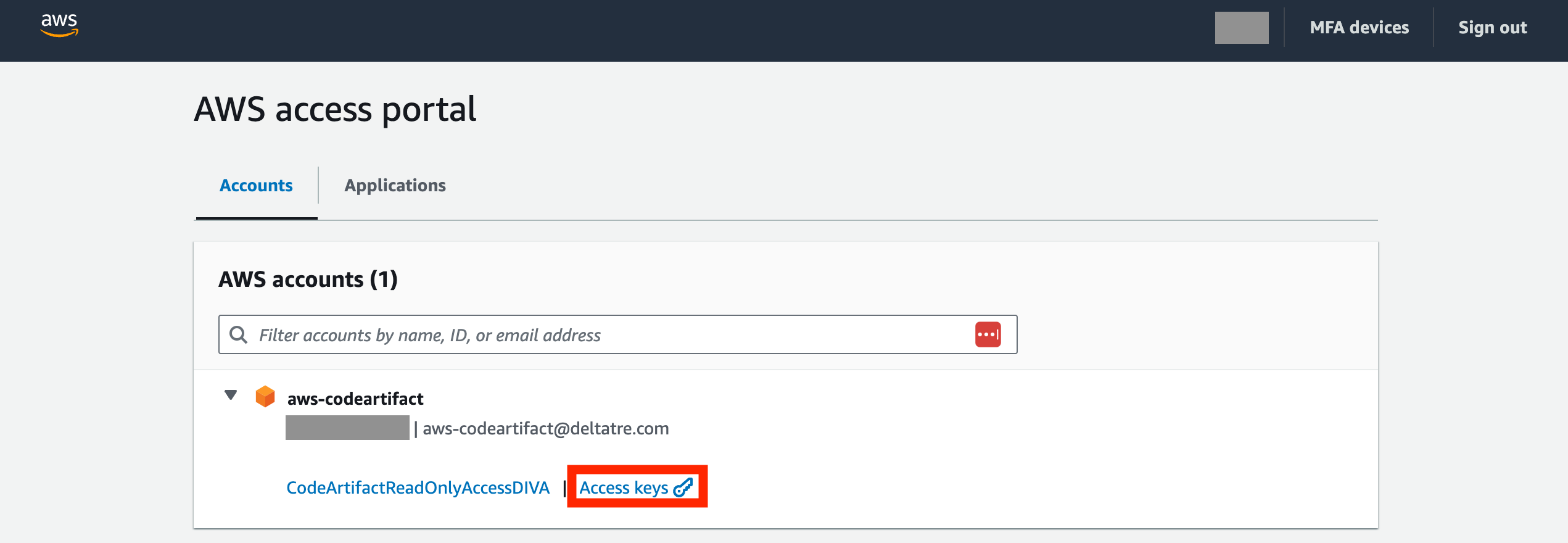
- Access https://deltatre.awsapps.com/start and select
Access keys.
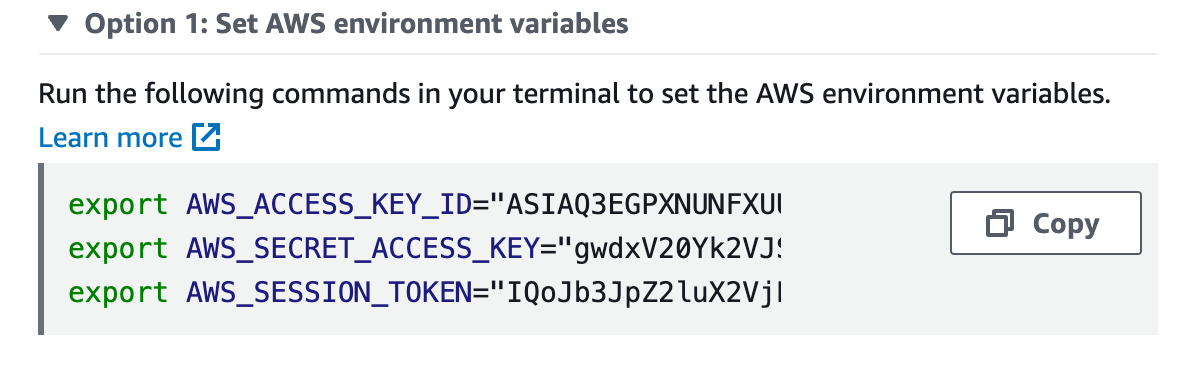
- In a terminal, execute the three imports in
Option 1: Set AWS environment variables.
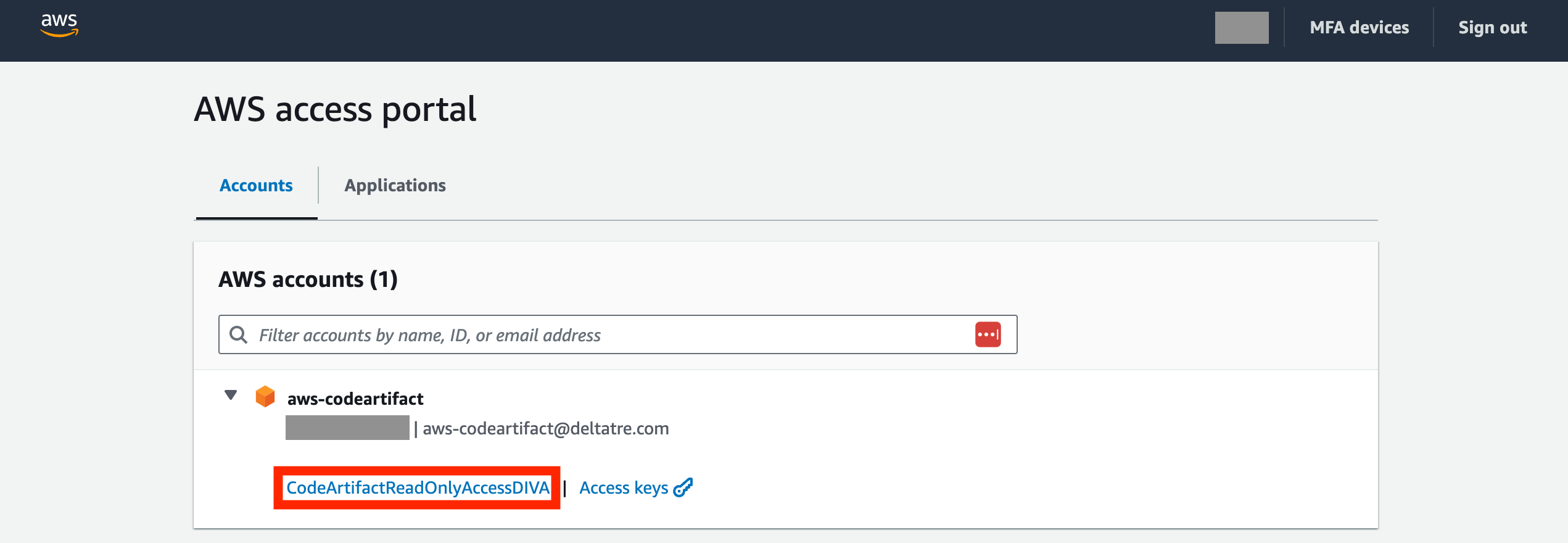
- Go back to https://deltatre.awsapps.com/start and select
CodeArtifactReadOnlyAccessDIVA.
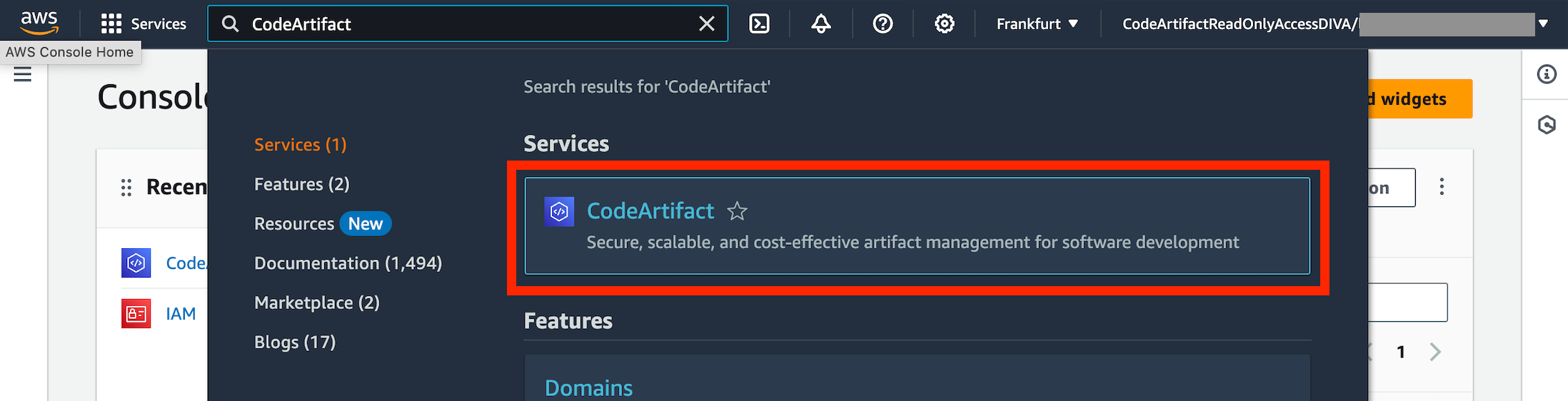
- Search for and select
CodeArtifact.
- Download and install
AWS CLI: follow the instructions on the AWS CLI installation page for your operating system. AWS CLI v2 is recommended.
Once installed, you can verify the installation by running:
aws --version
- Run AWS Configure: open your terminal and run the following command:
aws configure
-
Enter your AWS_ACCESS_KEY_ID, AWS_SECRET_ACCESS_KEY, Default region name, and Default output format when prompted.
-
Configure your Swift client using this AWS CLI CodeArtifact command. The login command fetches an authorization token from CodeArtifact using your AWS credentials and lasts 12 hours. It configures Swift for use with CodeArtifact by editing
~/.swiftpm/configuration/registries.jsonand updating the credentials. Inside the JSON file, you should see thedivaregistry. This tells SPM to search for dependencies using the AWS package registry service.To do this, you need an existing package already downloaded on your local machine. Open a terminal in the folder where the
Package.swiftfile is located and paste the credentials you received fromOption 1: Set AWS environment variables. It should look like this:
export AWS_ACCESS_KEY_ID="123"
export AWS_SECRET_ACCESS_KEY="abc"
export AWS_SESSION_TOKEN="==sd45f65sd4f56sd4f6sd465fa"
- Check your domain-owner identifier with the following command:
aws sts get-caller-identity --query Account --output text
- Download the required package (DivaIOS or DivaTVOS) with the following command:
aws codeartifact get-package-version-asset \
--domain "deltatre-diva" \
--domain-owner "<domain-owner>" \
--repository "Diva" \
--format generic \
--namespace "diva" \
--package "<package-name (DivaIOS/DivaTVOS)>" \
--package-version "<version>" \
--asset "<asset-name (DivaIOS/DivaTVOS)>.zip" \
--region "eu-central-1" \
<output-name>.zip
Step 2: Migrate the package integration
Overview
Starting with Diva 5.12.0, the Diva Swift Package integration has been simplified. Version 5.12.x consolidates the Diva integration under a single DivaIOS/DivaTVOS module.
Previously, the package explicitly exposed individual Diva framework targets:
targets: [
    "DivaAdsBeaconing",
    "DivaAdsCore",
    "DivaBOAdapter",
    "DivaCore",
    "DivaConvivaMediaAnalytics",
    "DivaDefinitions",
    "DivaIOS",
    "DivaGooglePalAnalytics",
    "DivaOMAnalytics",
    "OMSDK_Deltatre",
    "MD360Player4iOS",
    "ProgrammaticAccessLibrary",
    "SWXMLHash"
]
From 5.12.0, the Diva-specific targets are consolidated under DivaIOS/DivaTVOS:
targets: [
    "DivaIOS", //DivaTVOS
    "OMSDK_Deltatre",
    "ProgrammaticAccessLibrary",
    "YouboraLib",
    "ConvivaAVFoundation",
    "ConvivaSDK",
],
Removed direct Diva binary targets
The local .binaryTarget declarations for the following Diva modules have been removed:
- DivaAdsBeaconing
- DivaAdsCore
- DivaBOAdapter
- DivaConvivaMediaAnalytics
- DivaCore
- DivaDefinitions
- DivaGooglePalAnalytics
- DivaOMAnalytics
There is no longer any need to add or manage these modules as individual dependencies.
Installation
You can import the DivaIOS/DivaTVOS xcframework into your Xcode project by adding it as a framework dependency.
Required source-code changes
Existing integrations that directly import or reference types using the previous Diva module names must be updated. Use DivaIOS/DivaTVOS as the module import and namespace.
Replace imports of individual Diva modules with:
import DivaIOS/DivaTVOS
Before:
import DivaCore
From 5.12.0:
import DivaIOS/DivaTVOS
Apply the same change to any source files that import other Diva modules that are no longer exposed individually.
Update module-qualified type references
References that explicitly use a previous module name as a namespace must also be changed to DivaIOS/DivaTVOS.
Before:
init?(_ event: DivaCore.AnalyticsEvent) {
    // ...
}
From 5.12.0:
init?(_ event: DivaIOS(DivaTVOS).AnalyticsEvent) {
    // ...
}
This applies to all module-qualified references to Diva APIs that have moved under the DivaIOS/DivaTVOS module.
Migration checklist
- Update the Diva package dependency to version 5.12.x.
- Remove direct dependencies on the Diva frameworks that are no longer exposed as individual binary targets.
- Replace imports of removed Diva modules with
import DivaIOS/DivaTVOS. - Replace module-qualified references, for example
DivaCore.AnalyticsEvent→DivaIOS(DivaTVOS).AnalyticsEvent.
Step 3: Write your very first iOS/tvOS app with DIVA Player
What you need before starting
- Ensure the DIVA Back Office instance you rely on is running.
- Ask your video engineering team for the
videoIdandsettingsvalues.
Instantiation
Replace videoId and settings with the values provided by your video engineering team in the following code:
class ExampleVideoMetadataProvider {

}

extension ExampleVideoMetadataProvider: VideoMetadataProvider {
    func requestVideoMetadata(
        videoId: String,
        currentVideoMetadata: VideoMetadata?,
        playbackState: PlaybackState
    ) async throws -> VideoMetadata {
        SWVideoMetadataCleanModel.make(
            videoId: videoId,
            title: "title",
            image: "https://www.image.jpg",
            eventId: "eventId",
            programDateTime: "2018-07-15T13:40:15.681Z",
            trimIn: 0,
            trimOut: 100,
            assetState: .vod,
            ad: "https://divademo.deltatre.net/DIVAProduct/www/Data/Vast/skippable2.xml",
            sources: [
                SWVideoSourceCleanModel.make(
                    uri: "https://vod-ffwddevamsmediaservice.streaming.mediaservices.windows.net/6e8b64ef-feb3-4ea9-9c63-32ef7b45e1dd/6e8b64ef-feb3-4ea9-9c63-32ef7b45.ism/manifest(format=m3u8-aapl,filter=hls)",
                    format: "HLS"
                )
            ],
            audioTracks: [SWAudioTrackCleanModel(_id: "English1", selector: "English", label: "English")],
            defaultAudioTrackId: "English1",
            dvrType: .full
        )
    }
}

class FullscreenViewController: UIViewController {
    var diva: Diva?

    override func viewDidLoad() {
        super.viewDidLoad()

        Diva.isDebugMode = false
        Diva.mediaAnalyticsEnabled = true

        var config = DivaConfiguration(
            settings: settings,
            dictionary: dictionary,
            videoId: videoId,
            videoMetadataProvider: ExampleVideoMetadataProvider()
        )
        config.settingsError = "Settings Error"
        config.networkError = "Network Error"
        config.onVideoError = { error, videoMetadata in
            print("[VideoError] VideoError received for video: \(videoMetadata?.videoId ?? "unknown Id")")
            print("[VideoError] error: \(error.type.rawValue) message: \(error.message)")
        }
        config.onAnalyticEvent = { [weak self] event in
            guard self != nil else { return }
            var parameters = event.eventArguments
            parameters["interactive"] = "\(event.interactive)"
            Analytics.logEvent(event.type, parameters: parameters)
            print("[EVENT] \(event.type)")
        }
        config.onMediaAnalyticsUpdate = { [weak self] update in
            guard self != nil else { return }
            await ConvivaAnalytics.shared.handle(update)
            await YouboraAnalytics.shared.handle(update)
        }
        config.onExit = { [weak self] in
            self?.dismiss(animated: true)
        }

        Task { @MainActor [weak self] in
            guard let self else { return }
            self.diva = await Diva(configuration: config)
            self.diva?.setTargetView(view: self.view, viewController: self)
        }
    }

    deinit {
        diva = nil
    }
}